
After recent years of development, the home broadband market space has been saturated. By the end of 2020, China’s home broadband user penetration rate has reached 96%. The competition among operators in the home broadband market has also shifted from the competition for the number of new users to the competition for the quality of home broadband.
In the early days, operators’ home broadband services only provided broadband connections to users, and the operators’ installation and maintenance interface only went to the optical fiber modem (ONT).
With the development of IPTV and other home services, the home network from the optical modem to the service terminal has naturally become the object of operators’ operation and maintenance. Although the home network has a simple network structure, the quality of the home network has become the main reason affecting the quality of home broadband because users generally lack the appropriate network knowledge, and it is not easy for installation and maintenance personnel to enter the residence. According to statistics, about 60% of home broadband quality problems occur in the home network.
Components Of The Home Network
Home network usually consists of modem, router, IPTV set-top box, as well as optical modem to router, optical modem to IPTV set-top box connecting cables, as shown in the figure. The home network without IPTV service has no cable connection from optical modem to set-top box.
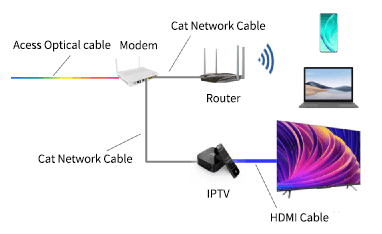
Both the router and the set-top box are connected to the optical modem through the network cable, the terminals such as cell phone, pad, computer, etc. are connected to the router through wifi, and the TV is connected to the set-top box through the HDMI connecting cable. The network cable is a 4-pair twisted cable, including CAT5, CAT5e and CAT6 cables.
Most fiber optic modems come with wifi function, but on the one hand, the wifi performance of fiber optic modems is weak, on the other hand, fiber optic modems are often installed in the home information box, the use of fiber optic modems wifi is not convenient for the coverage of wifi signals in the residence, so the vast majority of the home network using the router as an AP (wireless access point). There is also a small portion of the home network without a router, directly using the optical modem with wifi function as an AP, this part of the user usually open with IPTV service.
Key Quality Issues For Home Networks
Currently, the terminals of home broadband service are mainly: TV sets, computers, cell phones and other IoT devices.
Since IPTV service does not take up the contracted bandwidth, terminals other than IPTV are generally connected to the internet via wifi. Therefore, the wifi network speed at the point of daily use of user terminals in a residence directly affects the user’s experience.
In order to investigate the main issues in depth, 39 households in an eastern city H and 27 households in a southern city F of China were selected to test the wifi network speed in the residences (test time: January 2021 for city H and August 2022 for city F).
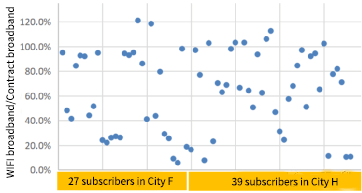
The downlink speed of wifi near the wifi router is called wifi bandwidth. Usually, the wifi bandwidth should reach 90% of the contracted bandwidth and then the wifi bandwidth is considered qualified.
However, in the test, the wifi bandwidth pass rate for home broadband users in both City H and City F is only 33.3%, of which 40.1% is for 100M users, and 26.5% is for users of 200M and above. The ratio of wifi bandwidth to contracted bandwidth of 66 users in H and F cities is shown in the figure below.
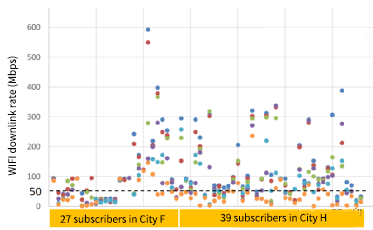
We continued to test the wifi network speed at the daily use points of user terminals in the above 66 user homes. Four to six daily use points were tested in each home, and the results of the internet speed tests at different test points are shown below.
Wifi network speed is linearly related to wifi bandwidth.
Due to the low wifi bandwidth pass rate, although the average contracted bandwidth of the above users is as high as 262.1Mbps, the wifi network speed at the point of daily use in the user’s residence is not fast, and the distribution of wifi network speed at the point of daily use of the user terminals in the 66 user’s residences is shown in Table.
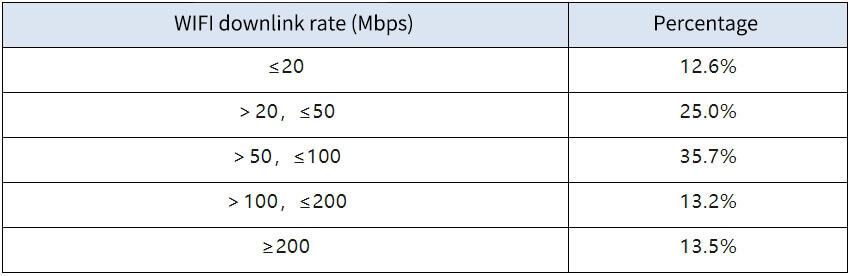
As can be seen from the above graph, low wifi bandwidth pass rate and low wifi rate are the main quality issues of home network.
Analysis Of The Causes Of Quality Problems In Home Networks
The quality of the home network is mainly related to the performance of the home network devices, the connection between the devices, the quality of the wifi signal in the residence, and the user’s usage.
1. Performance of equipment
The performance of the devices that have a greater impact on wifi network speed mainly includes: the bandwidth capacity of the router, the bandwidth capacity of the optical modem, and the stability of the device.
1.1 Router bandwidth capacity
Some older routers have poor bandwidth capabilities:
- The WAN port only supports a maximum of 100Mbps.
- Wifi only supports 2.4G single frequency; 2.4G single frequency router supports the maximum download rate on the one hand by the number of router antennas, and on the other hand and the use of the environment of the same frequency interference related to the maximum rate is generally not more than 200Mbps.
1.2 Bandwidth capacity of optical modems
The problem of bandwidth capability of old optical modems is similar to that of routers:
- The LAN port only supports up to 100Mbps.
- The wifi of the optical modem only supports 2.4G single-band; when using the optical modem as AP, the 2.4G single-band optical modem will form a constraint on the wifi network speed.
1.3 Stability of equipment
Some models of optical modems and set-top boxes have poor stability, which can easily lead to network failure.
Routers are usually purchased by users themselves, and some cheaper routers are also less stable and often drop connections. It is recommended to purchase a router with guaranteed connection quality.
2. Connections between equipment
2.1 Router and Optical Modem Connection
The main reasons in terms of the connection between the router and the optical modem include:
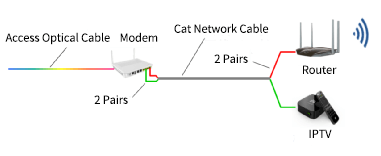
- The set-top box shares a network cable with the router. Many users’ optical modems are installed in the home information box, and the router is placed next to the TV set. However, there is usually only one network cable from the home information box to the TV set. In the installation, the installer will often be divided into two groups of four pairs of wires, each group of two pairs of wires, respectively, connected to the router and set-top box, as shown in Figure. Although this can be used, the two pairs of wires only support a maximum transmission rate of 100Mbps.
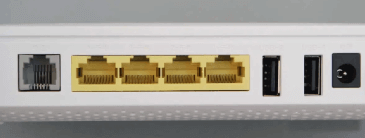
- The LAN port of the Gigabit optical modem is misconnected. The LAN port of a Gigabit optical modem usually contains one Gigabit port and one to two 100 Mbps ports, as shown in Figure (the yellow part of the interface in the figure is in order: Gigabit LAN, 100 Mbps LAN, 100 Mbps LAN and IPTV). The identification of the Gigabit port and the Hundred Gigabit port is not obvious, which leads to users connecting incorrectly.
- Inferior quality network cable. Some home wiring uses poor quality network cable, which makes it difficult for the transmission rate between the optical modem and the router to exceed 100Mbps.
2.2 Set-top box uplinks
The bandwidth of the set-top box does not take up the user’s contracted bandwidth, and it should be connected to the IPTV interface of the optical modem by a network cable.
However, some users’ set-top boxes are connected via wifi, so that the set-top box takes up the user’s contracted bandwidth, which will have a greater impact on the Internet speed of users whose contracted bandwidth is 100Mbps and below.
3. Signal quality of wifi in dwellings
Wifi signal quality can be reflected by the ratio of “wifi downlink rate to wifi bandwidth (%)” at the terminal location.
Let’s take the wifi signal test results of the above 66 households as an example, the download rate of test point A is equivalent to the wifi bandwidth, and the signal quality of other test points is shown in the figure below.
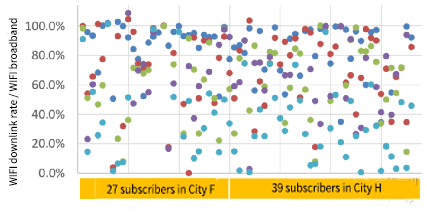
As can be seen from the graph above, the quality of wifi signals in residences is generally better, but the percentage of test sites with wifi signal quality below 20% is still 8.7%.
4. User access
The main reasons related to user usage include the use of the wifi 5G band, the long continuous use of the device, and the excessive number of terminals accessed by the AP.
4.1 Wifi 5G band not used
Since some devices must use the 2.4G band for wifi connection, users’ dual-band routers or dual-band optical modems are often set to two different wifi subnets.
Users do not pay attention to the difference between the two wifi subnets and do not connect to the wifi subnet of the 5G band, thus resulting in limited internet speed.
4.2 Long periods of continuous use of equipment
We all have this experience when using cell phones and computers, if the cell phone or computer is not turned off for a long time (e.g., more than 10 days), the operation will be slowed down, and it will be fine after a restart. The same goes for routers, optical modems and set-top boxes in the home network. If they are used continuously for a long period of time, the operation of the equipment will become slower and slower, resulting in Internet lag for the user.
4.3 Excessive number of terminals accessed by APs
The ability of the AP to access wifi terminals is related to the performance of the AP, when the AP is an optical modem or some low-end router, the number of wifi terminals that can be accessed at the same time is generally about 10, and the number of wifi terminals that can be accessed at the same time by high-end routers is usually more than 20. When the number of terminals accessed by the AP does not match the access capability, it will also make the user’s Internet experience worse.
Put at the end
The above analysis of the causes of home network quality problems is compiled based on the results of the analysis of the causes of home network quality problems of an operator in several provinces in China.
Since the causes of home network quality problems in different regions are different and the dimensions of analysis are not consistent, it is difficult to compile statistics on the proportion of the above factors in this paper.
However, it is relatively consistent that the performance of the equipment and the connection between the equipment are the most important factors affecting the quality of the home network in each region.